School ID / e-ID photo
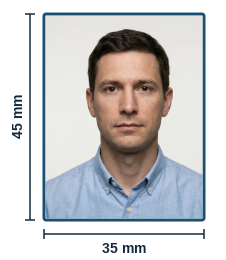
Schools usually want a photo as for an ID card: 35 × 45 mm proportions and a file of at least 492 × 633 px as a JPG. The file-size limit varies (often 1–5 MB), so confirm it with your school. Crop your photo from your phone in a few clicks.
Crop your photo for free No account. Your photo stays in your browser.
Size and resolution
The main preset “School ID card / e-ID” is 35 × 45 mm on paper, and the digital file must be min. 492 × 633 px (~357 dpi), and you save the file as JPG. The table below lists every preset for this document — pick the one required by the office, university or portal you are submitting the photo to.
| Preset | Size | Pixels | File |
|---|---|---|---|
| School ID card / e-ID | 35 × 45 mm | min. 492 × 633 px · ~357 dpi | JPG |
Photo requirements
The photo should be sharp, evenly lit and taken straight on, with the head filling the frame as the guidelines require. The key requirements are listed below; the recipient of the photo always sets the detailed rules.
- In colour, sharp, and taken no more than 6 months before you apply.
- Light, plain background; even lighting with no shadows on the face.
- From the top of the head to the upper shoulders; the face fills about 70-80% of the frame.
- Facing the camera, looking into the lens, mouth closed, eyebrows and eyes (pupils) visible.
- No hat or dark glasses - exceptions only with the required documentation (religion / eyesight).
- JPG format; confirm the maximum file size with your school (sometimes 1 MB, 2.5 MB or 5 MB).
How to take the photo with your phone at home
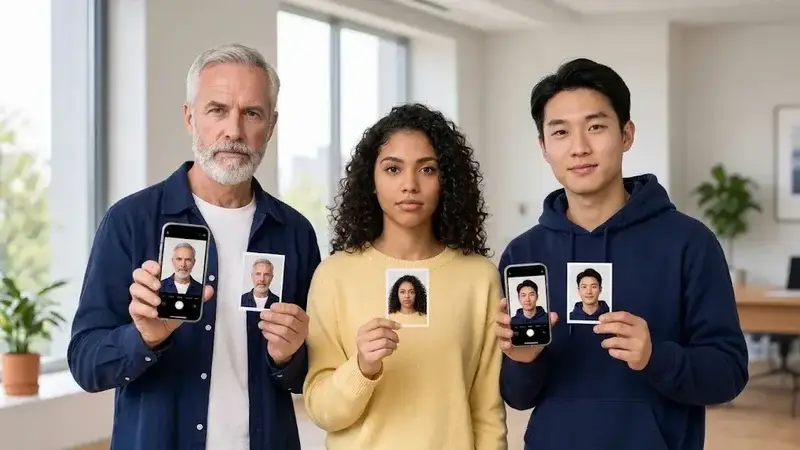
You can take a good document photo with your phone at home if you get three things right: even daylight without shadows, a light plain background, and a straight-on shot at eye level.
Light
Face a window with even daylight — no shadows on your face and no flash.
Background
Choose a light, plain wall. With a difficult background you can use the optional background replacement in LegiPhoto.
Pose
Camera at eye level, face towards the camera, looking into the lens, mouth closed, eyebrows and eyes visible. Ask someone to take the picture.
How to prepare a document photo
Preparing the photo in LegiPhoto takes four steps: choose the document format, upload your photo, crop it in the frame and download the finished file. Everything happens locally in your browser, with no upload to a server.
- Choose a format For example a student ID, ID card or passport.
- Upload a photo Take one with your phone camera or webcam, or pick a file from your device.
- Crop Move and zoom the photo in the frame until it matches the guidelines.
- Download Save the finished file as JPG or PNG.
Does the office want a paper print? Photo print sheet (10 × 15 cm, A4)
Does your school use Librus? Librus school ID photos
Frequently asked questions
Answers to the most common questions about the school ID photo: sizes, file format, background and what happens to your photo while you crop it in the browser.
What size is a school ID photo?
Most often 35 × 45 mm proportions and, for the digital version, a file of at least 492 × 633 px as a JPG. Confirm the maximum file size (sometimes 1 MB, 2.5 MB or 5 MB) with your school.
How many school ID photos do I need?
For an e-ID in Librus one digital JPG is usually enough. For a paper school ID the school or photographer may ask for several prints — confirm the number with the school office.
What background and pose are required?
A light plain background, even lighting without shadows on the face, facing the camera, looking into the lens, mouth closed, in colour and sharp.
Is my child’s photo uploaded to a server?
No. LegiPhoto crops the photo locally in your browser; the file is not sent to a server.
Is LegiPhoto free for a school ID photo?
Yes. Cropping your photo is free and needs no account. After downloading the file you can optionally support the project with a voluntary tip — nothing is required.
How do I take a school ID photo at home?
Stand facing a window with even daylight, no flash and no shadows on your face, in front of a plain light wall. Hold the camera at eye level, face the camera, look into the lens, mouth closed. Then crop the photo in LegiPhoto to 35 × 45 mm proportions.
Did it help? Buy us a coffee
LegiPhoto is free and needs no account. A voluntary coffee helps us keep improving it.
Buy us a coffeeSources and note
LegiPhoto is an independent tool and is not an official government service. Requirements of offices and universities can change — before you apply or upload the file, confirm dimensions, format and file-size limits with the recipient.
Photos for other documents
Published: · Last updated: